 Free Practice Workbook
Table of Contents
Introduction to Discount Factor
The discount factor in Excel is a weight that helps in determining the present value of future cash flows. If you multiply the future cash flows by the discount factor, it will provide you with the current value of those inflows.
The discount factor is the cornerstone of discounted cash flow (DCF) analysis. It is a key metric for a financial professional to know the current worth of any investment. It quantifies the current value of future cash flows i.e., it tells you the worth of the future cash flows today.
It helps you decide between different investment choices and valuations.
How to Calculate Discounted Cash Flow
Key Components of the Formula
The formula for the discount factor for each period is:
1 / (1 + r)^t
The key components that you have to consider are:
- Time period: Number of periods.
- Discount rate: Interest rate used to discount future cash flows.
- Cash flow: Amount of cash flow for each period.
Prepare Spreadsheet
First, you have to create columns for different factors:
- Year – It represents the timeline for expected cash flow. IT starts from the current year and go up till the duration of the cash flows.
- Cash Flow – The projected cash flows each year.
- Discount Factor – The rate at which cash flow needs to be discounted at.
- Prevent Value of Cash Flow.
How to Apply the Discount Factor
To apply the discount factor in Excel for DCF analysis, follow these detailed instructions:
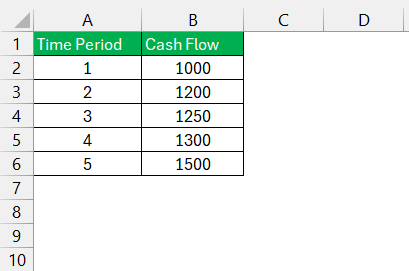
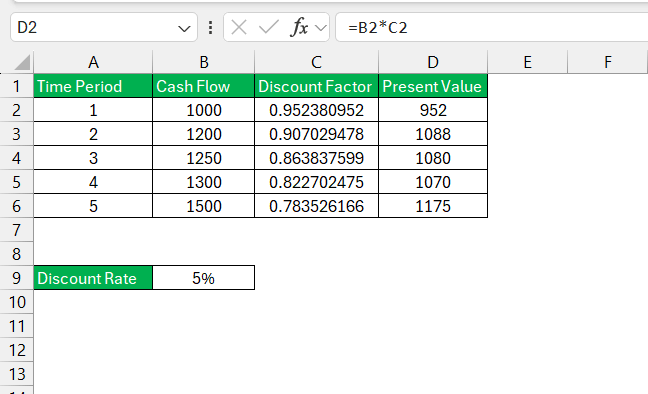
STEP 1: Input your series of projected cash flows in the Cash Flow column.
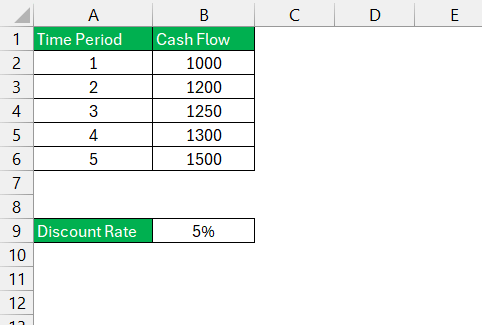
STEP 2: Choose a discount rate and input it into a cell.
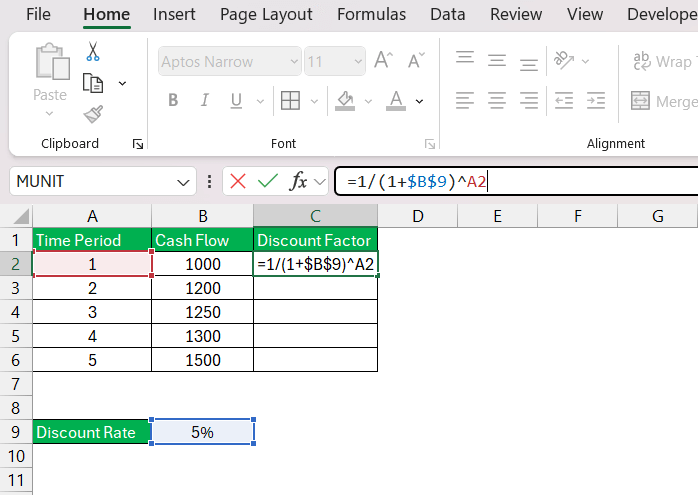
STEP 3: In the ‘Discount Factor’ column, input the formula
=1/(1+discount_rate)^year
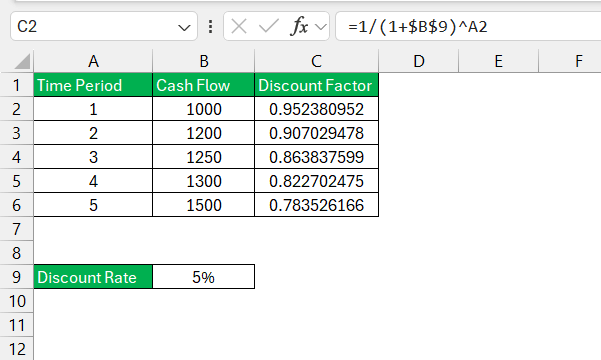
STEP 4: Press Enter to calculate the discount factor for the first year. Drag the formula down the column to fill in the discount factors for the rest of the periods.
STEP 5: Multiply each year’s cash flow by its corresponding discount factor to calculate the present value of that cash flow.
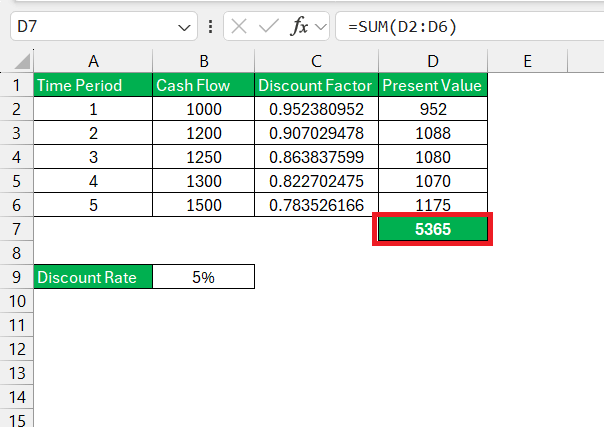
STEP 6: Calculate the total value of the investment by adding the present value of all cash flows.
Troubleshoot Common Issues
If you are getting errors in the DCF model, you can check the following to fix it:
- Check Data Inputs: Check that all cash flows and the discount rate are accurately entered into the spreadsheet.
- Formula Verification: Carefully review the formula for syntax errors.
- Cross-Referencing: Check the calculated present values with known benchmarks.
- Auditing Tools: Excel has built-in auditing tools like ‘Trace Precedents’ and ‘Trace Dependents’. They can be used to chekc which cells are getting impacted by the formula.

If the issue remains unsolved, you can seek external support by Microsoft.
Tips & Tricks
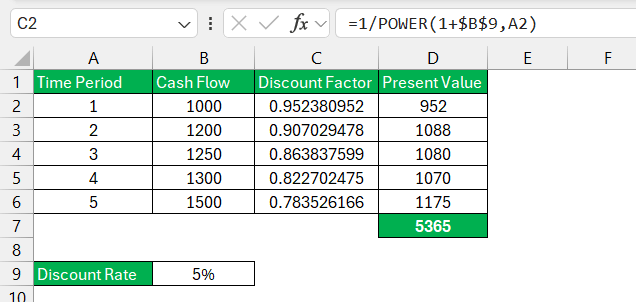
- Using the POWER Function: Instead of “1/(1+r)^t,” you can use Excel’s
POWERfunction to calculate the discount factor. It is particularly useful for larger models.
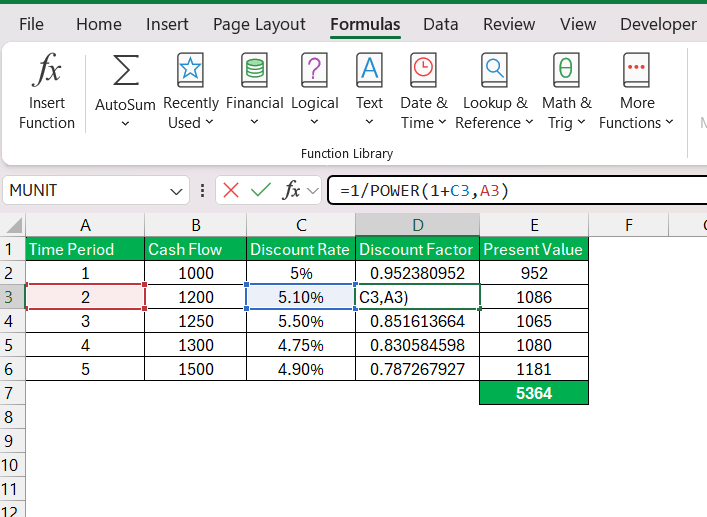
- Dynamic Discount Rate: If your discount rate varies across time periods, reference the specific cell for each period instead of a fixed value.
FAQs
What is the discount factor?
The discount factor is a percentage that is used to determine the present value of cash flows. The discount factor decreases as time progresses, showing that future money is worth less than the money you have today.
You can multiply this percentage by the future cash flows to get their current value.
How to calculate the discounting factor in Excel?
Follow the steps below to calculate the discount factor:
- Enter the time period.
- Enter the cash flow for each period.
- Enter the discount rate.
- Use this formula to get discount factor: =1/(1+discount_rate)^number_of_periods
How to Avoid Common Mistakes in DCF?
To avoid common pitfalls in discount factor calculations:
- Check the accuracy of cash flow projections and discount rates.
- Check formulas for correct syntax and references.
- Use the auditing tools options available in Excel to trace errors.
What is net present value (npv)?
Net present value (NPV) is a financial metric used to assess the profitability of an investment. It represents the difference between the present value of cash inflows and outflows over a period. A positive NPV indicates that the projected earnings exceed the anticipated costs. So, a positive NPV means that the investment is potentially profitable.

John Michaloudis is a former accountant and finance analyst at General Electric, a Microsoft MVP since 2020, an Amazon #1 bestselling author of 4 Microsoft Excel books and teacher of Microsoft Excel & Office over at his flagship MyExcelOnline Academy Online Course.

 30 Days - Full Access









